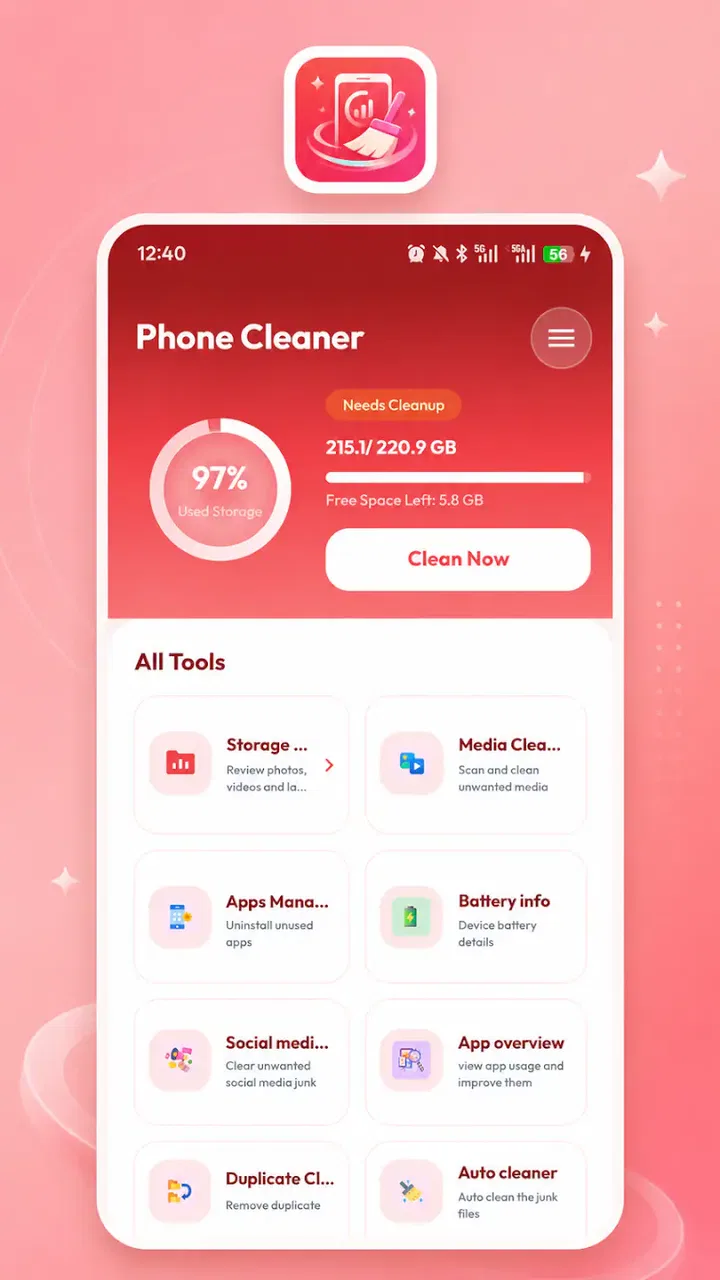
Aurevion Phone Cleaner
- 3.9
- Rating
- 50.00K
- Installs
- Free
- Price

 Analysis by App-foxy
When a phone starts warning me about storage, I usually want a simple answer: what is taking up space, what can be removed safely, and which apps deserve to stay? Aurevion Phone Cleaner is built around that practical problem. It is a free tools app from FULL FAST FABULOUS CO., LIMITED that brings storage review, app management, and file organization into one place. I see it as a useful starting point for people who want a clearer view of their device without immediately paying for a subscription.
My opinion is positive but measured. This is not the kind of utility I would install blindly and then let make every cleanup decision for me. Its value depends on how carefully I review what it presents. Used as a visual guide for finding clutter and forgotten apps, it can make routine maintenance less frustrating. Used as an automatic “delete everything” button, it is the wrong approach for protecting photos, downloads, documents, and messages.
How I would decide whether to use it
The first question is not whether a cleaner app sounds convenient. It is whether I need one at all. Android already offers built-in storage screens and app controls, while file managers can handle many manual organization tasks. Those options are often enough for someone who only removes a large video occasionally or uninstalls apps directly from system settings. Aurevion becomes more interesting when I want those jobs gathered into a more focused storage workflow.
You May Also Like

 Pandora - Music & Podcasts
Pandora’s Music Is Easy to Start, but Harder to Recover
Pandora’s strength is its low-effort path from a seed to a station. Its weak spot is how much confidence it asks you to place in connection, setup, and quiet recovery.

 AccuWeather: Weather Radar
AccuWeather Review: A Quick, Clear Forecast for Everyday Decisions
For everyday plans, the best forecast is the one you can understand quickly. AccuWeather makes rain timing, radar, and local conditions easy to act on, with a few trade-offs.

 Hill Climb Racing
Why Hill Climb Racing Still Turns Crashes Into One More Run
A tiny car, a bumpy hill and one more upgrade: Hill Climb Racing keeps resurfacing because its simple chaos makes every near-miss feel personal.

 AliExpress - Shopping App
AliExpress Makes Global Shopping Feel Personal, but Shoppers Bear the Risk
AliExpress turns a global marketplace into a pocket-sized discovery engine. Its reach is useful, its shopping loop compelling, and its trade-offs easy to miss.

 Lords Mobile: Kingdom Wars
Lords Mobile Is a Kingdom-Building Routine, Not a Quick Match
A case-by-case verdict on the building, battles, device demands, and social commitments that make Lords Mobile rewarding for some players and exhausting for others.

 PDF Scanner app - TapScanner
TapScanner Makes Paperwork Easier to Capture, Check, and Share
TapScanner makes scanning with a phone feel less like a rescue operation and more like a dependable step in getting work done. Its capture tools are useful, though not flawless.
More From Our News Desk
View All News


I would judge it on four practical points: how quickly I can understand the storage situation, how much control I retain before deleting anything, whether app management feels easier than using system menus, and whether the routine is simple enough to repeat. A cleaner that shows plenty of categories but makes safe decisions difficult is less useful than a modest tool with clear review steps.
The app is free, carries an Everyone age rating, and supports devices running Android 8.0 or later. That makes it approachable for a broad range of Android users, including people with older phones that may not have the newest storage interface. Its current version is 6.0, so I would still treat every suggested cleanup item as something to inspect rather than assuming the version alone guarantees perfect results on every device.
There is also a useful expectation-setting detail in its public reception. Aurevion has a 3.9 average from around 265 ratings and has passed 50 thousand installs. To me, that suggests a real but still relatively modest user base: enough interest to make the app worth considering, but not a reason to assume it will behave identically across every phone brand and Android skin.
Start with a storage audit, not a deletion session
My preferred first use would be an audit. I would open the app when the phone is working normally, look through its storage view, and note which categories appear to be growing. That first pass matters because storage pressure is often caused by one forgotten folder or a handful of unusually large files, not by hundreds of tiny items.
A practical habit is to separate “I recognize this” from “I no longer need this.” A downloaded film may be obvious, but a document with an unfamiliar filename may still be important. Screenshots can be disposable, yet some contain receipts, delivery details, or reference information. The app can help surface candidates; the final decision should remain mine.
I would also avoid cleaning immediately before a trip, a work deadline, or a device transfer. The benefit of recovering space is rarely worth the risk of rushing through unfamiliar file names. A calm review at home gives me time to open questionable items in another app and confirm that they are genuinely disposable.
Why the combined approach is convenient
The strongest idea here is the combination of storage review, app management, and file organization. Normally, I may jump between a system storage page, an app list, and a file manager. That fragmentation makes it easy to forget why I opened one screen or to abandon the task halfway through. A focused utility can reduce that mental switching.
For example, imagine I am preparing an older Android phone for a weekend away. I notice that the camera cannot save new pictures. Instead of browsing randomly, I can use the storage view to identify the largest areas, check whether unused apps are contributing, and then review files that are no longer useful. The important advantage is not a magical increase in storage; it is having a more deliberate path from problem to decision.
That same workflow is helpful before installing a large game, downloading offline maps, or recording a long event. I can first remove items I have already consumed, then check the app list for software I have not opened in months. This is more sensible than deleting random images simply because they are easy to select.
Three habits that make the app safer and more useful
My first tip is to clean by purpose rather than by file type alone. A folder full of images may contain both disposable screenshots and irreplaceable family pictures. I would review screenshots, downloads, and large media separately, asking what each group is for. This small distinction prevents the common mistake of treating all files in one category as equivalent.
My second tip is to use app management as a decision aid, not a race to reduce the app count. I would look for apps that were installed for a one-time task, duplicate tools that perform the same job, and games I no longer play. Before removing anything, I would check whether it stores local drafts, offline content, or settings that I may want later. Reinstalling an app is not always the same as restoring its previous state.
My third tip is to create a before-and-after checkpoint. I would note the free space shown by the phone, perform one small cleanup group, and check the result. If the gain is tiny, I would stop rather than continuing through increasingly uncertain files. This approach also reveals whether the real issue is a large media collection, an app that keeps rebuilding cache, or a device that simply has limited capacity.
A fourth useful habit is to leave personal archives out of a rushed cleanup. If I want to organize old photos or documents, I would first copy important material to a trusted location using my normal backup method. A storage tool is not a substitute for a backup plan. That distinction is especially important for anyone managing work files, school documents, or family memories from a phone.
Where Aurevion fits better than the usual alternatives
Compared with relying only on Android settings, Aurevion may feel more task-oriented. System menus are dependable for uninstalling apps and checking capacity, but they can spread related actions across different screens. Someone who prefers a single place to inspect storage and then move into app or file management may find this more comfortable.
Compared with a traditional file manager, the appeal is different. File managers are usually better when I already know the exact folder or file I want to move, rename, or open. Aurevion is more suitable when I begin with a vague concern such as “my phone is full” and need help narrowing down where to look. I would choose the file manager for precise filing work and this app for a guided storage review.
Compared with broad phone-booster apps, I prefer a narrower expectation. I would not install Aurevion hoping for a dramatic speed transformation. Storage organization can make a device easier to manage, and removing unwanted apps can reduce clutter, but a cleaner should not be treated as a guaranteed performance cure. If the phone is slow because of an aging battery, limited memory, a problematic app, or an operating-system issue, storage cleanup may not solve the underlying cause.
There is also a trade-off between convenience and visibility. A specialized cleaner may make suggestions easier to notice, while manual system tools can feel more transparent because I know exactly which screen I am using. Users who are highly cautious about file handling may prefer the slower built-in route. Users who repeatedly postpone maintenance because it feels scattered may benefit more from a central workflow.
When another option is the better choice
I would skip this type of app if my phone has plenty of free space and I rarely download or accumulate files. Adding another utility in that situation may create more maintenance than it removes. I would also be cautious if I already have a file manager that gives me a clear, comfortable view of storage and app settings.
People who need advanced cloud synchronization, detailed duplicate detection, encrypted file handling, or professional backup controls should look for tools designed specifically for those jobs. Storage organization is not the same as archival management. Aurevion may help me find candidates for cleanup, but I would not replace a dedicated backup or document-management workflow with it.
I would also avoid making it the main tool on a shared or work-managed device without checking the device’s normal rules first. A phone used for business may contain files whose importance is not obvious from their names. In that setting, the safest approach is to follow the organization’s storage and retention process, even if manual review takes longer.
What switching to this workflow really involves
The cost of switching is not mainly financial, since the app is free. The real cost is attention. I need to learn where its storage categories lead, decide which recommendations I trust, and build a habit of checking items before removing them. That is a reasonable exchange if my current method is disorganized, but it is unnecessary if Android’s existing tools already work well for me.
There is also a learning cost whenever I move from manual cleanup to a centralized app. I may initially spend more time comparing the app’s view with the system’s view. That is worthwhile during the first session because it helps me understand what the tool is showing. After that, I would keep cleanups small and purposeful rather than attempting a complete digital spring-cleaning in one sitting.
For someone with an older Android phone, the minimum operating-system requirement is worth checking before planning around the app. Devices on Android 8.0 or newer are within its stated compatibility range. If I were helping a family member, I would confirm the phone’s Android version first and then make sure they understand that deleting files is a permanent choice unless those files exist elsewhere.
The developer, FULL FAST FABULOUS CO., LIMITED, positions the product in the practical tools space rather than as a game or entertainment app. That matches how I would use it: occasionally, when storage needs attention, not as something that must remain open all day. Its free price makes testing relatively easy, but I would still remove it if it does not make my personal cleanup routine clearer.
Answers to the questions I would ask before installing
Is it suitable for a first-time cleaner-app user? Yes, if that person is willing to review suggestions carefully. The storage and management focus is easier to understand than a tool that mixes maintenance with many unrelated functions. I would still sit with a less confident user during the first cleanup and explain why unknown files should not be removed automatically.
Can it replace Android’s built-in storage controls? I would not think of it as a complete replacement. The system remains the authority for core device settings and app removal. Aurevion is better viewed as an additional way to organize the investigation, especially when I want storage review and file-related tasks presented together.
Will it recover space every time? Not necessarily. If my storage is already well organized, there may be little to remove. If the main space usage comes from important photos, videos, or offline content, the app cannot make those files disappear without my choosing to delete them. Its usefulness is strongest when forgotten apps and unnecessary files are genuinely present.
Is it appropriate for sensitive files? I would use extra care. Any cleanup workflow involving personal documents, images, or downloads deserves a manual check before deletion. I would not assume that a file is safe to remove merely because it appears old, duplicated, or unfamiliar. For sensitive material, I would back it up first and use the phone’s normal sharing or storage controls where appropriate.
How often should I use it? I would not schedule aggressive daily cleaning. A periodic review after a busy month of downloads, travel, photography, or app testing makes more sense. Frequent small checks are safer than rare, rushed purges, but only if the app actually helps me understand the device rather than encouraging unnecessary deletion.
My recommendation for the right kind of user
I recommend Aurevion Phone Cleaner to Android users who want a free, focused way to inspect storage, review installed apps, and organize files from a common workflow. It is especially appealing if the phone feels cluttered but the cause is unclear, or if system menus make routine maintenance feel scattered. The Everyone rating and Android 8.0 compatibility also make it approachable for many everyday users.
My recommendation comes with one firm condition: treat it as a review assistant, not an authority. Open the storage view, identify the likely source of the problem, inspect files in context, and remove only what I can confidently replace or no longer need. That method brings out the app’s practical strength while reducing the risk that convenience turns into accidental loss.
I would choose a built-in Android tool instead when I need only a quick uninstall or a basic capacity check. I would choose a dedicated file manager for detailed folder work, and a dedicated backup solution for protecting important material. Aurevion sits between those choices, offering a more organized cleanup starting point without replacing every specialized tool.
Overall, the app earns a place on my shortlist for straightforward storage maintenance, not because it promises to transform a phone, but because it can make an otherwise annoying task easier to approach. Its 3.9 average and growing install base give it enough real-world interest to try, while the balanced rating reminds me to keep expectations sensible. If I needed a calm, guided look at what is occupying my device, I would test it. If my phone is already tidy or I need advanced file protection, I would stay with the alternatives I already trust.
FAQs for Aurevion Phone Cleaner
01What is Aurevion Phone Cleaner and what does it do?
Aurevion Phone Cleaner is designed to help Android users organize and maintain storage space by identifying items such as cached files, temporary data, duplicate media, and other files that may no longer be needed. Its usefulness depends on the device and the type of content stored, so it should be treated as a cleanup assistant rather than a tool that dramatically boosts every phone’s performance.
02Is Aurevion Phone Cleaner safe to use?
The application can be useful when its requested permissions are reviewed carefully and cleanup suggestions are checked before confirmation. As with any storage-management app, avoid granting access that seems unrelated to its main purpose, and do not automatically delete files you may need. Reviewing categories and filenames first is especially important for photos, videos, documents, and messaging-app folders.
03Can Aurevion Phone Cleaner improve my phone’s speed or battery life?
Aurevion Phone Cleaner may help a device feel less cluttered when storage is nearly full, particularly after removing unnecessary temporary files or large items. However, it cannot guarantee a noticeable speed increase or longer battery life. Performance problems can also come from outdated software, demanding apps, weak hardware, or battery wear, which a cleaner cannot fully resolve.
04Does Aurevion Phone Cleaner delete personal photos, videos, or important files?
The app should not remove personal content without user confirmation, but cleanup recommendations can sometimes include duplicate files, large media, downloads, or folders created by other applications. Before using a one-tap cleaning option, inspect the proposed files and keep anything important. Creating a backup through cloud storage or another safe location is recommended before major cleanup.
05Is Aurevion Phone Cleaner free, and are there in-app purchases or advertisements?
Availability of features, advertisements, subscriptions, or one-time purchases may vary according to the version distributed through the app store and the user’s region. Check the current Google Play listing for pricing details before downloading or starting a trial. Pay particular attention to subscription terms, renewal conditions, and which cleaning or management tools are restricted to premium users.
Pros
- Quickly identifies large files
- duplicates
- and unused media.
- Simple interface makes storage cleanup easy for nontechnical users.
- Useful file categories help you review items before deleting them.
- Can free space without requiring advanced device configuration.
- Helpful for spotting forgotten downloads and oversized videos.
Cons
- Some cleanup results may require manual checking to avoid deleting useful files.
- Performance can vary significantly between older and newer devices.
- Scanning large photo and video libraries may take noticeable time.
- Cleaner recommendations may feel limited compared with full file managers.
- Privacy details should be reviewed carefully before granting storage access.

Aurevion Phone Cleaner
Gallery